What Is App Store Optimization And Why You Should Care
Picture this, you’ve spent months on research and development and finally launch your app on the app store. You spend your marketing $ on ads on different channels (social media, web etc.), but all of that without consideration of how app stores work would be half baked. Distribution matters as much as the product.
In the context of product management, there are popular frameworks like AIDA or AIDAOR - the first step of which is “Attention” or how you get your target user’s attention. Just like Search Engine Optimization (SEO), which aims to increase web traffic to your website from search engines, App Store Optimization (ASO) refers to the process of increasing your app’s visibility and organic reach on an app store. ASO is an important part of reducing your app’s cost of acquisition (CAC).
Before we get into the details, it is important to understand how app stores broadly work.
Understanding app stores
The two most prominent app stores - App Store (iOS) and Play Store (Android) have grown to host thousands of apps. Over the years, these stores have put in strict guidelines for app review, marketing and content.
App Store
- Upto 30 Characters allowed for the app name.
- Certain keywords (like free, top etc.) are restricted.
- Ranking in search results is primarily driven by : app name, downloads and engagement, reviews and ratings.
Play Store
- Upto 30 characters allowed for the app name.
- Certain keywords (like free, top etc.) are restricted.
- Ranking in search results is primarily driven by : app name, downloads and engagement, reviews and ratings, update cycle.
- Apps show up in results based on reviews too - if a review mentions a keyword, it will likely feed into the search.
Choosing the right keywords
Just like the app name, the words used to describe your app matter significantly when it comes to search ranking. Keywords must be simple - using a service such as Adwords helps in indentifying the top keywords that best align with your app.
Choosing the right visual assets
Visual assets such as app screenshots, logo are a crucial lever that attract users to your app - so it is important to have visually appealing content.
App ratings and reviews
App ratings and reviews contstitute an important factor in how your app is ranked on search results as well as under store categories. Apps with higher ratings are more likely to be downloaded by users and rank higher in search results.
Quoting Apple’s documentation,
Ratings and reviews influence how your app ranks in search results, and can affect whether someone downloads your app. Individual ratings inform your apps summary rating, which is displayed on your product page and in search results.
Similarly from Google Developers’ blogpost :
Google Play ratings and reviews are extremely important in helping users decide which apps to install
However, the problem with reviews is that over 90% of app users do not review apps on the stores. This can be attributed to the experience - if people want to review apps, they have to go to the respective store, find your app and then add their reviews and comments. Therefore it is important to implement a prompt for users to rate and review within your app.
Here’s the workflow for in app reviews on Android from the documentation :

For iOS here’s how it looks, from the documentation :
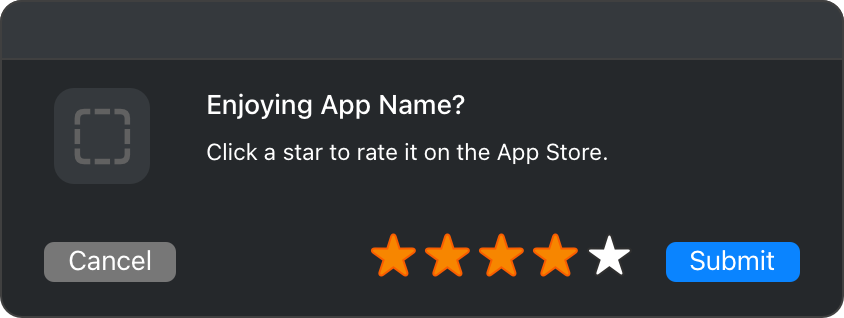
Apple has also provided guidance in terms of the user experience when prompting users to review your app.
Ask for a rating only after the user has demonstrated engagement with your app. For example, prompt the user upon the completion of a game level or productivity task. Never ask for a rating on first launch or during onboarding. Allow ample time to form an opinion. Don’t interrupt the user, especially when they’re performing a time-sensitive or stressful task. Look for logical pauses or stopping points, where a rating request makes the most sense. Don’t be a pest. Repeated rating prompts can be irritating, and may even negatively influence the user’s opinion of your app. Allow at least a week or two between rating requests and only prompt again after the user has demonstrated additional engagement with your app.
For iOS, showing this prompt is limited to three occurrences per app within a 365 day period so it’s important to be careful while implementing this feature. Similarly, Google Play has a quota system in place to limit how often a user can be shown the review dialog.
Recommendations :
- Implement in app update to allow users to rate the app. This can be triggered when the user has opened the app during the tournament, or favorites a player or scrolls through the feed.
- Choose the right keywords - the USGA’s marketing plan for their championships as well as their app must be aligned. Keywords for the app must derive from the overall marketing material and enable users to find and download the app effectively.
- Implement an in app satisfaction tracker to understand user pain points and effectively address them.